I recently added article about web storage and demonstrated how to use local storage and session storage. So i thought to go further and create a application based on html5 web storage so that me and you all can better understand how web storage works and how it can be coded.    So here we are creating jquery mobile Iphone/Ipad application which is simple Todo app for iphone ipad using jquery mobile and web storage, where you can list your todo’s and once its completed you delete it from list. For this app i am using local storage so if you create a list and then come back after few days it will be there as it is, so you can use this app for your daily tasks management.
add_todo.html
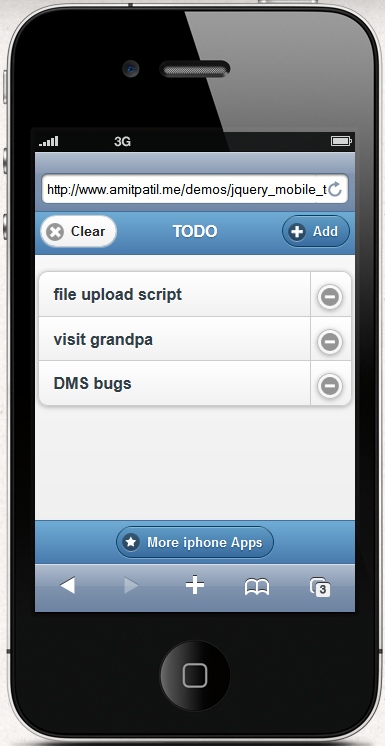 |
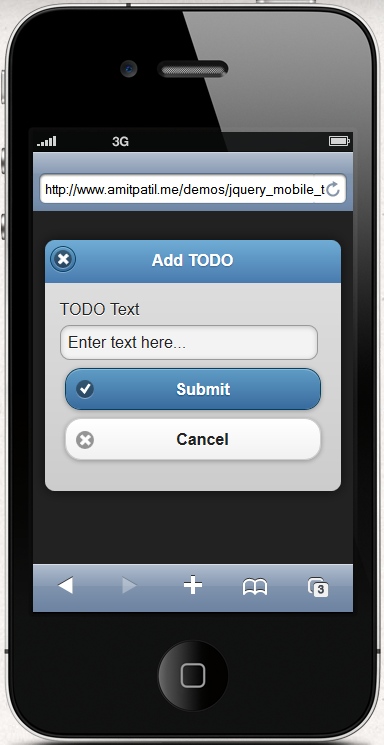 |
Index.php
|
1 2 3 4 5 6 7 8 9 10 11 12 |
<html> <head> <title>TODO App</title> <meta charset="utf-8"> <meta name="viewport" content="width=device-width, initial-scale=1"> <link rel="stylesheet" href="http://code.jquery.com/mobile/1.1.0/jquery.mobile-1.1.0.min.css" /> <script src="http://ajax.googleapis.com/ajax/libs/jquery/1.7.1/jquery.min.js"> </script> <script src="http://code.jquery.com/mobile/1.1.0/jquery.mobile-1.1.0.min.js"> </script> </head> <body onload="onBodyLoad()"> |
<a href=”https://amitpatil.me/?s=iphone+ipad” data-theme=”b” data-icon=”star”>More iphone Apps</a> </div> </body> </html>
|
1 2 3 4 5 6 7 8 9 10 11 12 13 14 15 16 17 18 19 20 21 22 23 24 25 26 27 28 29 30 31 32 33 34 35 36 37 38 39 40 |
var i = localStorage.length; function onBodyLoad(){ var todo = ""; create_new_list(); $("#clear").click(function(){ localStorage.clear(); $("#todo_list li").fadeOut(function(){ $(this).html(""); }); }); $("#remove").live("click",function(e){ var index = $(this).closest("li").attr("id"); $(this).closest("li").slideUp(function(){ // remove the selected item localStorage.removeItem('names_'+index); // rearrange localstorage array for(i=0; i < localStorage.length; i++) { if( !localStorage.getItem("names_"+i)) { localStorage.setItem("names_"+i, localStorage.getItem('names_' + (i+1) ) ); localStorage.removeItem('names_'+ (i+1) ); } } // clear existing list UI $("#todo_list").html(""); // create new list create_new_list(); }); }); } function create_new_list(){ for (var i = 0; i < localStorage.length; i++){ todo = localStorage.getItem('names_'+i); $("#todo_list").append(' |
|
1 2 3 4 5 6 7 8 9 10 11 12 13 14 |
'); } // Refresh list so jquery mobile can apply iphone look to the list $("#todo_list").listview(); $("#todo_list").listview("refresh"); } function save_todo(){ var todo = $("#textinput1").val(); if(todo.length){ // store item in local storage localStorage['names_'+i] = todo; // Update todo list $("#todo_list").append(' |
|
1 2 3 4 5 6 7 8 |
'); // Refresh list so jquery mobile can apply iphone look to the list $("#todo_list").listview(); $("#todo_list").listview("refresh"); i++; } } |
|
1 2 3 4 5 6 7 |
<html> <head> <meta charset="utf-8"> <meta name="viewport" content="width=device-width, initial-scale=1"> <link rel="stylesheet" href="themes/default/" /> </head> <body> |
Add TODO
|
1 2 |
</body> </html> |





Hi Amit. I noticed that when a note is a little long, you can’t see the rest of the text when viewed on small devices or when your browser is minimized. It shows … and when you click on it nothing happens.
Is there any way to have it so when someone clicks on the message, it shows the rest of the message?
Kev, If you like to implement that functionality, open index.html file and make below changes to it, it will solve your problem.
1) Locate the line which says
// update todo listand replace the
$("#todo_list").append('<li id="'+i+'"><a href="#" rel="nofollow">'+todo+'</a><a href="#" data-rel="dialog" data-withtransition="slideup" id="remove">Remove</a></li>');
$("#todo_list").append('<li id="'+i+'"><a href="#" rel="nofollow"><span style="white-space:normal;">'+todo+'</span></a><a href="#" data-rel="dialog" data-transition="slideup" id="remove" rel="nofollow">Remove</a></li>');Notice the change
<span style="white-space:normal;">'+todo+'</span>2) Locate
function create_new_list()in the same code and apply the same change, wrap'+todo+'with"<span style="white-space:normal;">+'todo'+</span>Or simply view source of the demo page and overwrite it with existing code in index.html page. Let me know if you have any problem with it.
Thank you for this example, it is really awesome.
Is it possible to click on the item in the list and go to a seperate form and save additional information in that form?
Thanks!
Chris
Yes it can be done, using simple javascript.
hi amit. when you press ‘enter’, it doesn’t takes you back to the index page. it just refreshes and the dialog box where you enter your task comes up again. is there any way you can just press enter and not have to click submit everytime? thanks!
Yes it can be done, On keypress event check if keycode is 13 then call save_todo() function and return false; so form will not submit and todo will get saved.
Thanks for the quick response Amit. It worked perfectly, beautiful job.
I have one more question for you. I noticed a link for docs-dialogs.html in the add_todo.html. I don’t have a page like that. Do I need it?
Save
No you dont need it, It should work without that page, I guess its there by mistake. remove it or let it be there, it will work either way.
Ok, cool, I replaced it with # and it still works. Do you think it’s possible to make the list editable or would that be too much of a hassle?
Yes its bit more hassle, you will have to attach “index” of each item in its holder so when you click on edit item it will again recall that item in editing form and when you click on save button it will replace old value with new one. FYI i am using localstorage feature of html5. Read more here http://stackoverflow.com/questions/7265028/how-do-i-change-a-single-value-inside-a-localstorage-item and http://jsfiddle.net/F8sF2/
It sounds a little too complicated for me but thanks for all your help.
Hello Amit…i would really like to know more about Html 5
Please you can Pm me on kersyduru at gmail
Yes i will be definitely posting more posts related to HTML5, keep visiting.
Hello Amit,
I’m trying this out in Eclipse for an android app, but the clear and remove click functions won’t work. I’ve tried using the same versions of jquery and jquery mobile that you’re using, but still nothing. I’ve moved the js around: top, bottom, in the doc ready, but nothing again. Any ideas would be appreciated. Everything but clear and remove works. Thanks.
Are you trying o creae a app using Phonegap (cordova) ? As per my knowledge i believe that local storage is supported in android browsers so it should work. May be you would like to check is its really supported using below code
if(typeof(Storage)!=="undefined")

  {

    // Yes! localStorage and sessionStorage support!

  }

else

  {

    // Sorry! No web storage support..

  }
Thanks for this, it is awesome.
Is it possible to click on an item in the list and go to a form to save additional information?
Thanks!!
Chris
Yes you can do it using javascript or may be a simple
Hey there! I just wanted to ask if you ever have any problems with hackers?
My last blog (wordpress) was hacked and I ended up losing many months
of hard work due to no backup. Do you have any methods to protect against hackers?
Its better to backup your blog data always. There are backup plugins too. Install one and be happy
Hello :). Just wanted to ask, where can I locate the saved todo list? And is ‘localStorage’ a fixed variable in HTML? Thank you.
You can find firefox plugin to explore the localstorage database
I am new in using htmls and javascripts too, i could not put all of those codes together. can you please help me in putting them together and mail to ibrahimjrn@gmail.com
How do you install this on IOS or do you have to package with some program? Can i just move the files to the ipad and click on the index.html file to get the website running?
I am not sure if it will work for you if you just copy them and run directly. But if you bundle those files with phonegap it will surely work.